Navigating the high-octane 2026 futures market requires more than just a directional bias; it requires a surgical approach to execution. On BingX, a single large market order can often lead to high slippage or telegraph your intentions to the order book, moving the price against you before you are fully filled. To combat this, professional traders use Scaled Orders.
As one of the best derivatives exchanges worldwide, BingX has introduced the Scaled Order feature to allow both institutional and retail traders to build positions with institutional-grade precision. By automating the process of scaling in or scaling out, you ensure your trades are executed across a strategic price range rather than a single, potentially sub-optimal point.
This guide breaks down exactly what a Scaled Order is, the logic behind different distribution models, and how to use this algorithmic tool to protect your trades from volatility on the BingX futures market.
What Is a Scaled Order and How Does It Work?
A Scaled Order is an algorithmic trading tool that automatically decomposes a large order into multiple smaller limit sub-orders within a user-defined price range. Instead of hitting the Buy button and hoping for the best at one price, a Scaled Order spreads your liquidity across the order book.
In practice, Scaled Orders function as a set-and-forget strategy for position building. In a Scaled Buy, sub-orders are placed at incrementally lower prices to catch a descending market, lowering your average entry cost. In a Scaled Sell, sub-orders are placed at incrementally higher prices as the market rises, helping you capture maximum profit during a rally. By staggering these entries, you avoid the market impact of a single large trade, which often triggers local volatility and results in poor execution prices.
How Scaled Orders Work on BingX Futures
On BingX, Scaled Orders are engineered for flexibility and control. When you deploy a Scaled Order, the system manages the batching of your trades based on three core pillars:
- Price Range: You define the Floor and Ceiling of your execution. The system will never place a sub-order outside of these boundaries.
- Order Count: BingX allows you to split a single trade into up to 10 sub-orders. This allows for a granular distribution that mimics the behavior of iceberg orders used by whales.
- Distribution Logic: This is the brain of the order. You can choose how both the Price and the Size of each sub-order are allocated.
What Are the Different Types of Distribution Models for Scaled Orders?
- Flat (Evenly Split): Every sub-order has the exact same size and is spaced at equal price intervals. This is ideal for range-bound markets where you have no specific directional bias.
- Ascending: Order sizes or price intervals grow larger as the price moves up. This is typically used for selling into strength to capture a higher average exit.
- Descending: Order sizes or price intervals grow larger as the price moves down. This is a classic 'Buy the Dip' strategy, where you commit more capital as the asset becomes cheaper.
Why Professional Traders Use Scaled Orders: Key Benefits
Here's why professional traders transition from standard orders to BingX Scaled Orders to achieve superior execution and risk management.
- Slippage Control: Unlike standard orders that can suffer high slippage during large volume trades, Scaled Orders minimize slippage by accessing liquidity in smaller, manageable chunks.
- Reduced Market Impact: While large single orders are highly visible and can move the market against you, Scaled Orders disguise your total position size by staggering entries.
- Execution Flexibility: Standard orders are typically all-or-nothing at a single price point, whereas Scaled Orders offer dynamic execution through multiple entries and exits.
- Optimized Average Price: Instead of being locked into a fixed price, Scaled Orders smooth your entry across a defined range to achieve a more favorable average cost.
- Operational Efficiency: Scaled Orders replace the tedious manual process of scaling in with a fully automated, algorithmic system.
Scaled Orders vs. Standard Market and Limit Orders in Futures Trading
|
Feature |
Single Limit/Market Order |
BingX Scaled Order |
|
Slippage |
High for large volumes |
Minimal (Liquidity is accessed in chunks) |
|
Market Impact |
High (Visible to other traders) |
Low (Disguises total position size) |
|
Execution |
All-or-nothing at one price |
Dynamic (Multiple entries/exits) |
|
Average Price |
Fixed |
Optimized (Smoothed across a range) |
|
Effort |
Manual |
Fully Automated |
While standard orders are effective for immediate execution, they often force traders to accept a liquidity premium in the form of higher slippage, especially when order sizes exceed 1% of the 5-minute trading volume. On BingX, transitioning to Scaled Orders shifts the execution risk from a single point of failure to a distributed average.
For instance, by fragmenting a 1,000 SOL order into 10 staggered sub-orders, a trader avoids the flash-fill trap where a market order eats through the thin layers of the order book, potentially resulting in an entry price 0.5%–1.5% worse than the ticker price. Practically, this algorithmic approach allows you to capture hidden liquidity and volatility wicks, mathematically ensuring that your entry remains closer to the global Mark Price than the localized, volatile Last Price.
How to Use Scaled Orders on BingX: A Step-by-Step Guide
Deploying a scaled strategy on BingX is a streamlined process available across both desktop and mobile platforms. Ensure your app is updated to Version 4.54.0 or above to access these algorithmic features.
Using Scaled Orders on BingX Web
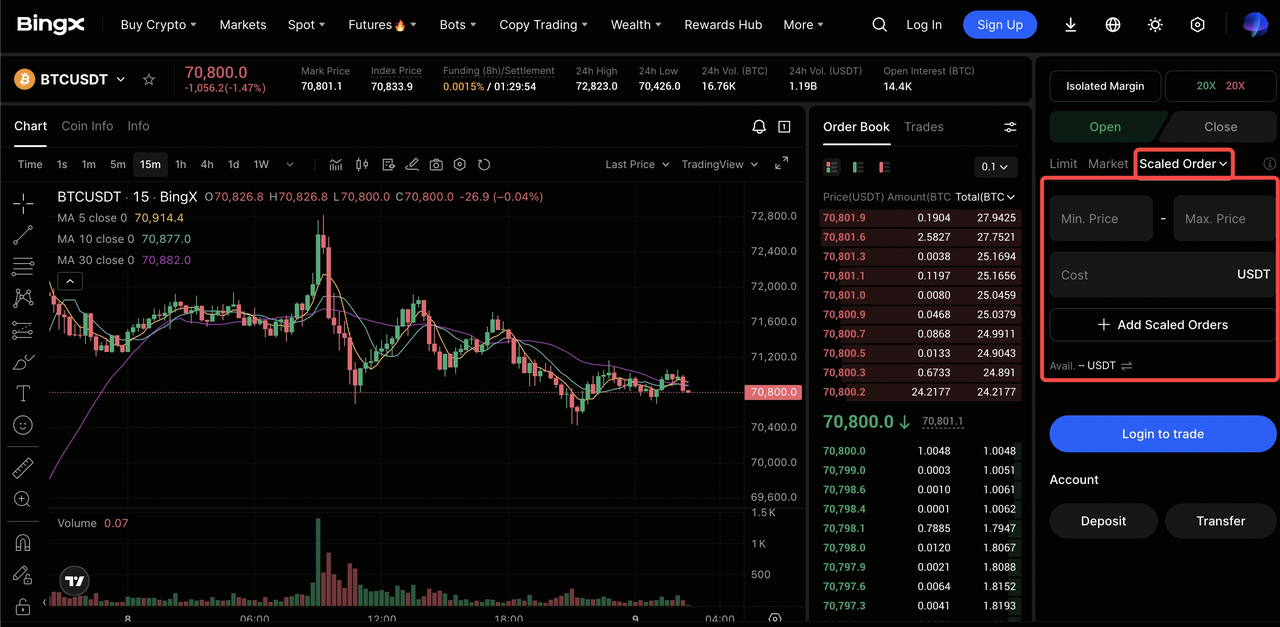
The web interface provides a comprehensive view of the order book and chart, making it ideal for precision planning.
- Access the Trading Pair: Navigate to the Perpetual Futures section and select your desired trading pair, e.g., BTC/USDT.
- Toggle Scaled Order: In the order placement panel on the right, click the current order type dropdown from the default Limit and select Scaled Order.
- Set Your Parameters:
- Price Range: Enter your Lower Price and Upper Price. For a Long, the lower price is your deepest entry; for a Short, the upper price is your final ceiling.
- Total Qty: Enter the cumulative size of the entire position.
- Configure Distribution: Click Add Scaled Orders to set the Order Count up to 10 and choose your Price/Size Distribution, such as Flat, Ascending, or Descending.
- Review and Execute: Click Open Long or Open Short. You can immediately monitor the individual sub-orders in the Current Orders tab at the bottom of the screen.
How to Set Up a Scaled Order on the BingX App
The mobile experience is optimized for efficiency, allowing you to set complex distribution ranges with just a few taps.
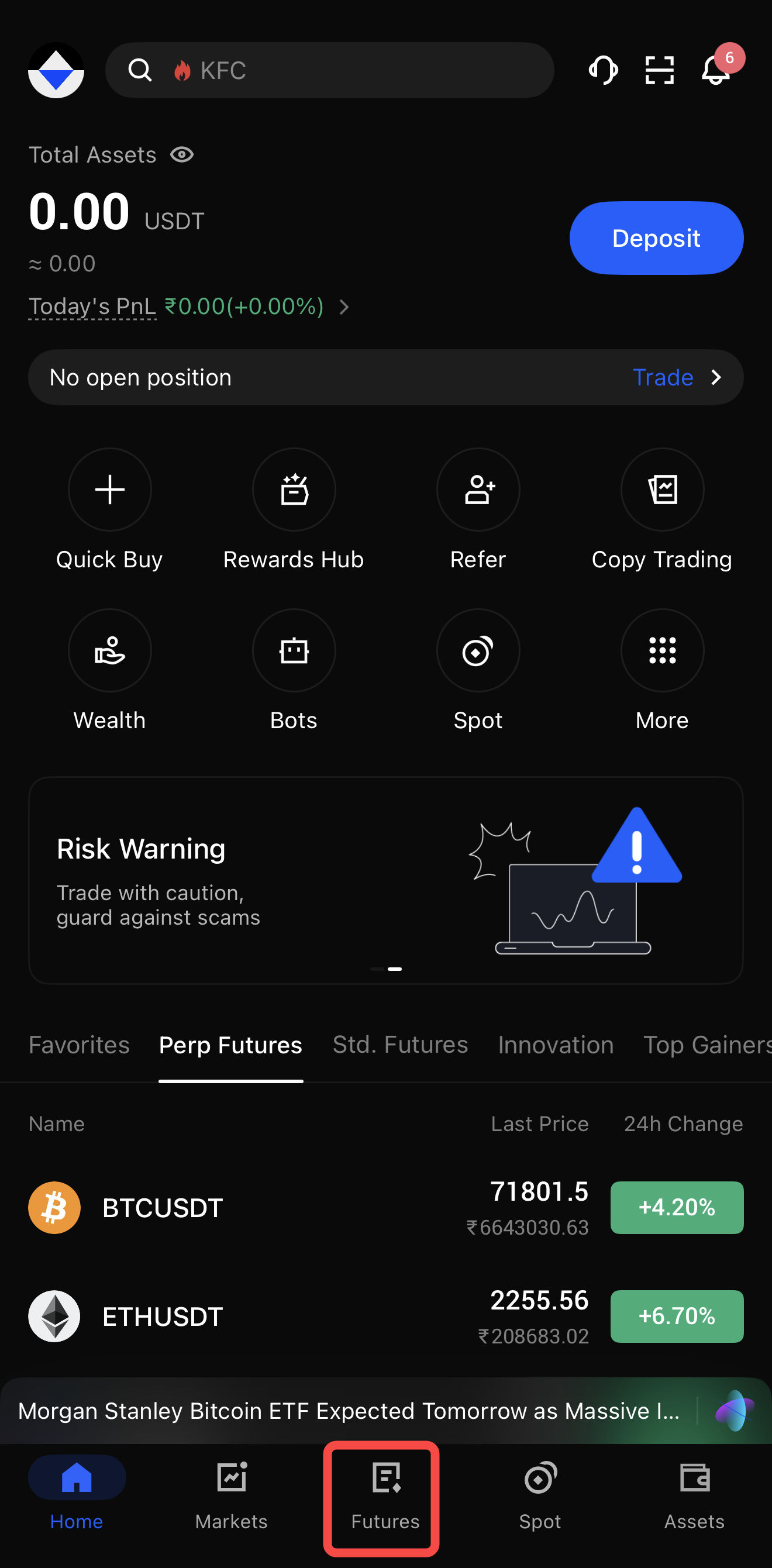
1. Enter the Futures Tab: Open the BingX App, tap Futures on the bottom section of the homepage.
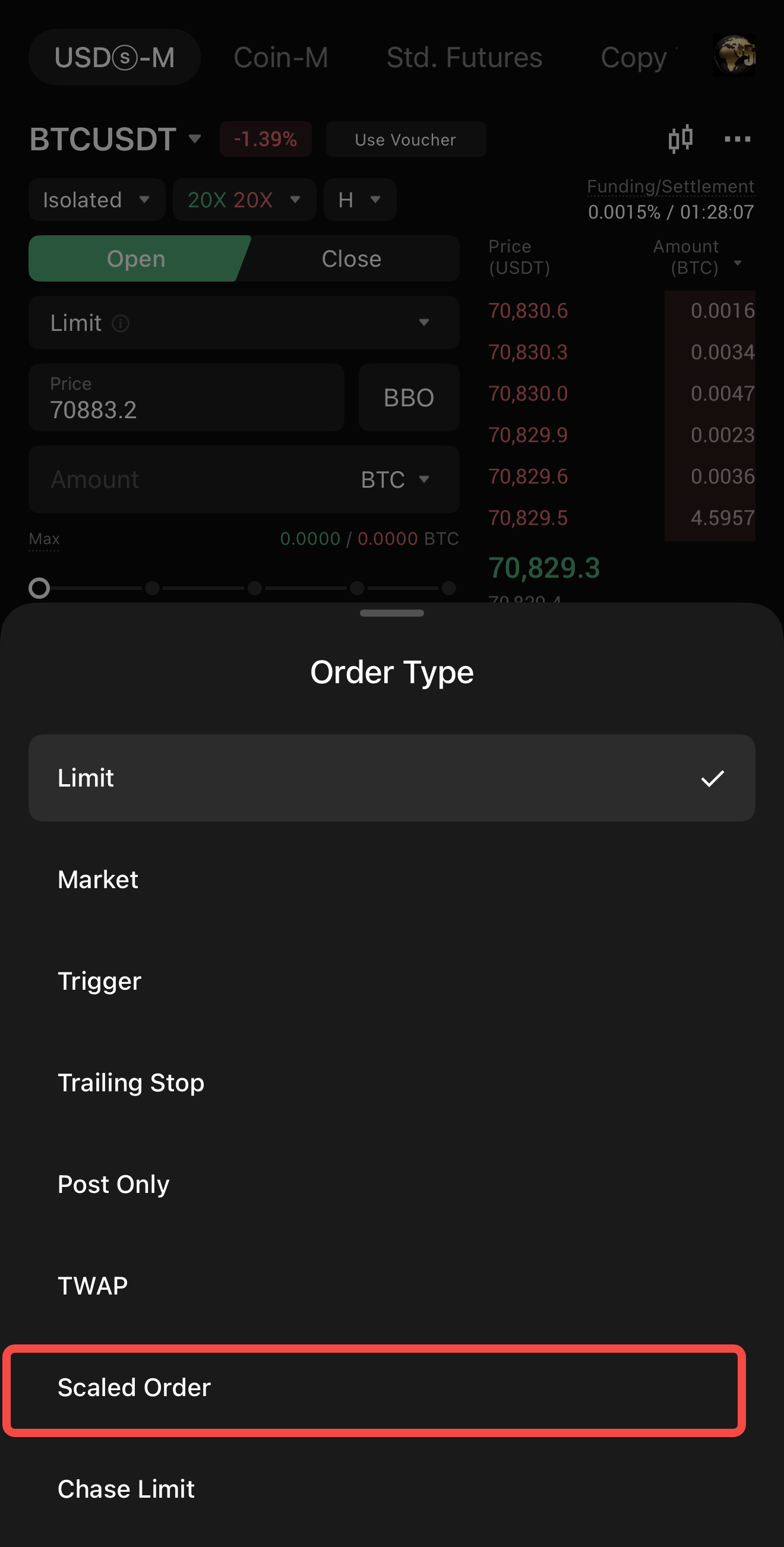
2. Select Scaled Order Type: Tap the order type button (next to the margin mode) and choose Scaled Order from the list of advanced order types.
3. Define Your Range & Size: Input your preferred Price Range and the total Quantity you wish to trade.
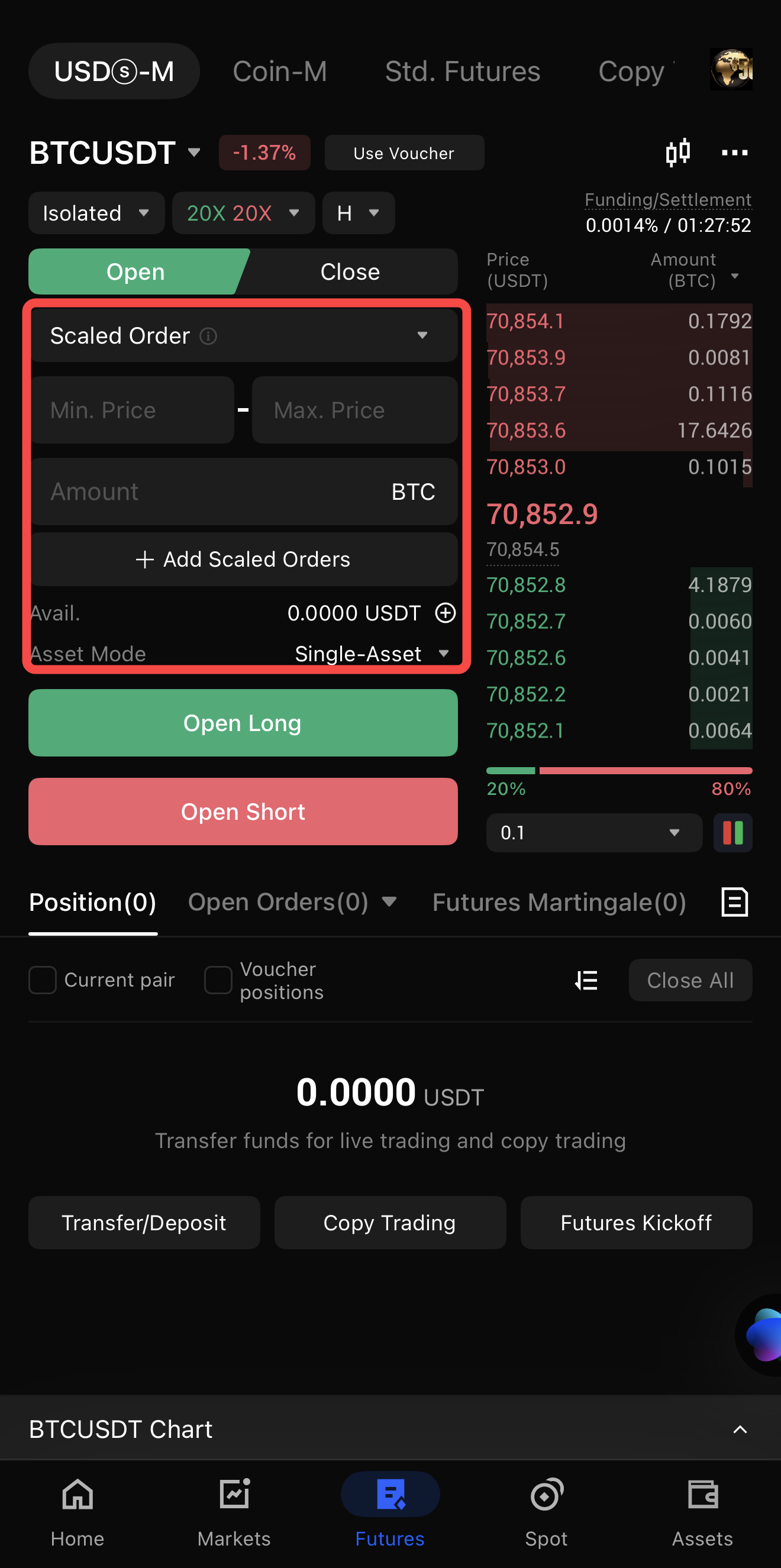
4. Customize the Split:
- Tap the Add Scaled Orders option to add as many sub-orders (2–10) as you want the algorithm to generate.
- Select your Distribution Mode to determine if you want your orders to be evenly split or weighted (Ascending/Descending).
5. Confirm the Trade: Tap Open Long or Open Short. A confirmation pop-up will appear; once confirmed, the system will batch-place your limit orders. You can view or cancel them in the Orders section of your active position.
Top 4 Tips for Smarter Position Building with Scaled Orders
Maximize your execution efficiency by leveraging these advanced tactical insights designed for the BingX Scaled Order algorithm.
- Avoid 'All-In' Bias: Use the Descending Size distribution when longing a support level. This ensures that if the price wicks lower, your largest orders are filled at the cheapest prices, significantly lowering your liquidation price.
- Manual Customization: BingX allows you to manually tweak the sub-orders before confirming. If you see a specific historical support level within your range, you can increase the size of that specific sub-order.
- Note on Constraints: Remember that Scaled Orders do not currently support Reduce-Only or Guaranteed Price features. Always ensure you have sufficient margin to cover the total Notional Value of the scaled strategy.
- Check the App Version: If you are trading on mobile, ensure you are on version 4.54.0 or above to access the full algorithmic suite.
Conclusion: Build Your Positions with Algorithmic Edge
The Scaled Order feature is a game-changer for traders who have moved beyond simple buy and sell mechanics. By decoupling your entry from a single price point, BingX provides a professional-grade environment where you can manage slippage and market impact with ease.
While Scaled Orders optimize your entry, remember that they are a tool for execution, not a replacement for strategy. Always use the BingX Futures Calculator to determine your risk-to-reward ratio before deploying an automated range.
Ready to optimize your entries? Try setting up a Scaled Order on your favorite pair on BingX today and experience the difference in your average filled price.
Related Reading
- How to Get Started with Perpetual Futures Trading on BingX: A 2026 Beginner's Guide
- What Are the Different Order Types Supported on BingX Futures and How to Use Them?
- What Is Mark Price in Futures Trading and How to Use It on BingX Futures?
- What Is Limit Order in Futures Trading and How to Use It on BingX Futures? A 2026 Guide
- What Is Market Order in Futures Trading and How to Use It on BingX Futures?
- What Is a Time-Weighted Average Price (TWAP) Order on BingX Futures and How to Use It?
- What Are Post-Only Orders and How to Use Them to Settle Lower Fees on BingX Futures?
FAQs on Scaled Orders in Futures Trading
1. Can I cancel a Scaled Order after it has started filling?
Yes. You can cancel individual sub-orders or the entire remaining scaled sequence from the Current Orders tab at any time.
2. Is there an extra fee for using Scaled Orders?
No. BingX does not charge additional fees for the algorithmic tool itself. You only pay the standard trading fees (Maker/Taker) for each sub-order as it executes.
3. What happens if the price never reaches my full range?
The system will only execute the sub-orders that the market price touches. If you set 10 orders but the price only hits 5 of them before reversing, you will remain in a position with 50% of your intended size.
4. Can I use Scaled Orders for Take-Profit?
Absolutely. By setting a Scaled Order in the opposite direction of your trade, e.g., a Scaled Sell for a Long position, you can scale out of your profits across a price range.
