Navigating the high-octane 2026 futures market requires more than just a set and forget strategy; it requires a surgical approach to order execution. On BingX futures, the Chase Limit Order is the advanced engine designed for traders who are tired of missing entries during rapid price moves. Traditional limit orders often get left behind when a trend takes off, forcing traders to manually cancel and replace orders, a process that wastes precious seconds and potential profits.
As a top global derivatives exchange, BingX has engineered the Chase Limit Order to bridge the gap between the surgical precision of a limit order and the guaranteed speed of a market order. By utilizing this feature, you can ensure your position is always at the front of the queue, dynamically adjusting to market shifts while maintaining the cost benefits of a Maker.
This guide breaks down exactly what a Chase Limit Order is, the two primary execution modes, why it is the ultimate tool for maximizing fill rates without sacrificing your entry price, and how to use Chase Limit orders on BingX.
What Is a Chase Limit Order and How Does It Work in Futures Trading?
A Chase Limit Order is a dynamic limit order that automatically updates its price to match the best available bid or ask on the order book. Unlike a standard limit order, which remains static at a fixed price, a Chase Limit Order follows the market as it moves. Its primary purpose is to ensure swift execution in volatile conditions while keeping the trader in the Maker category, which typically incurs lower trading fees.
In practice, the Chase Limit Order functions as an automated trading assistant. Instead of you manually updating your bid as the price of Bitcoin climbs, the BingX system does it for you. It continuously re-quotes your order at the top of the book until the order is fully filled, canceled by the user, or hits a pre-defined Max Chase Distance. This ensures you capture trading opportunities efficiently while minimizing the waiting time that often leads to missed trades.
Read more: What Are the Different Order Types Supported on BingX Futures and How to Use Them?
What Are the Two Execution Modes of Chase Limit Orders?
To provide maximum flexibility, BingX offers two distinct modes for chasing the market. Understanding which one to use depends on how aggressively you want to enter the position.
1. Chase Bid1/Ask1: The Frontrunner Mode
In this scenario, your order is programmed to stay at the very top of the order book (Bid1 for Longs, Ask1 for Shorts).
- The Logic: If you place a Long order at $70,000 and the market moves to $70,010, your order price automatically updates to $70,010.
- The Benefit: It ensures you are always the most competitive buyer or seller, leading to the highest possible fill rate.
2. Chase Distance from Bid1/Ask1: The Spread Mode
This mode allows you to set a fixed distance in price or percentage from the best bid or ask.
- The Logic: If you set a distance of 5 USDT on a Long order when Bid1 is $70,000, your order is placed at $69,995. If the market Bid1 moves up to $70,050, your order chases it up to $70,045.
- The Benefit: This is ideal for traders who want to maintain a specific spread, perhaps to capture small pullbacks while still moving with the overall trend.
How to Set a Safety Net: Maximum Chase Distance
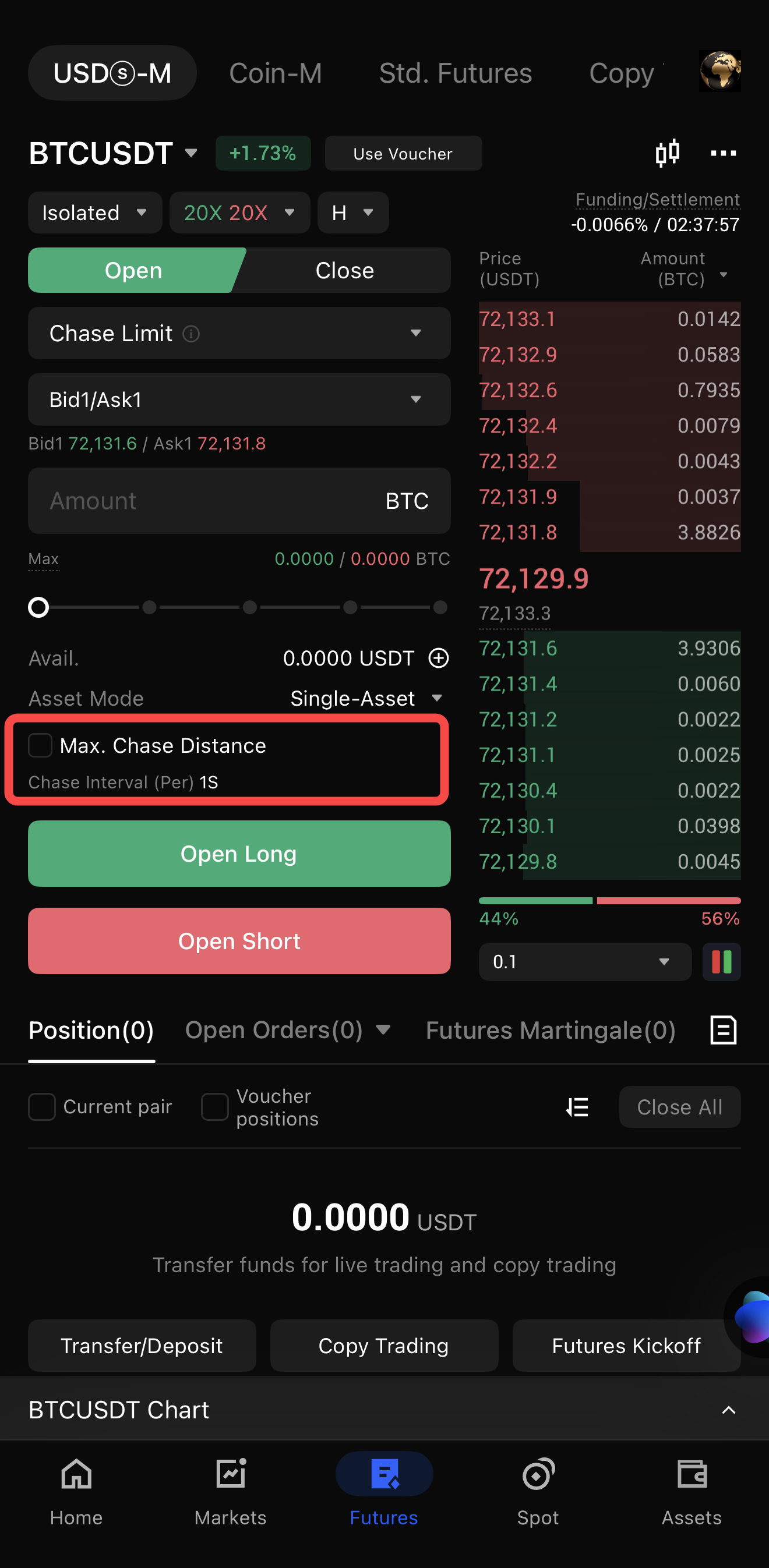
While chasing is effective, doing so blindly in a vertical market can be risky. BingX includes a Maximum Chase Distance as a critical safety mechanism. This is the boundary beyond which your order will stop following the price.
- Fixed Setting: Once the market moves beyond your Max Distance, the order stops chasing and becomes a standard static limit order at that price.
- Cancel Setting: If the price moves too far too fast, the system automatically cancels the unfilled portion of your order to prevent an unfavorable entry.
Why Use Chase Limit Orders: 3 Key Advantages
Chase Limit Orders solve the three biggest headaches of futures execution:
- Swift Execution: By staying at the top of the book, you avoid the frustration of watching the price move away from your static limit order.
- Fee Optimization: Because these orders are placed on the book and wait for a counterparty, they are classified as Maker orders. This allows you to pay lower fees compared to Market (Taker) orders.
- Slippage Protection: Unlike Market orders, which can get filled at significantly worse prices during low liquidity, a Chase Limit Order only moves within your specified parameters.
How to Use Chase Limit Orders on BingX: Step-by-Step
Setting up a Chase Limit Order is a straightforward process that can be completed in just a few clicks within the BingX trading interface.
Using Chase Limit Orders on BingX Web
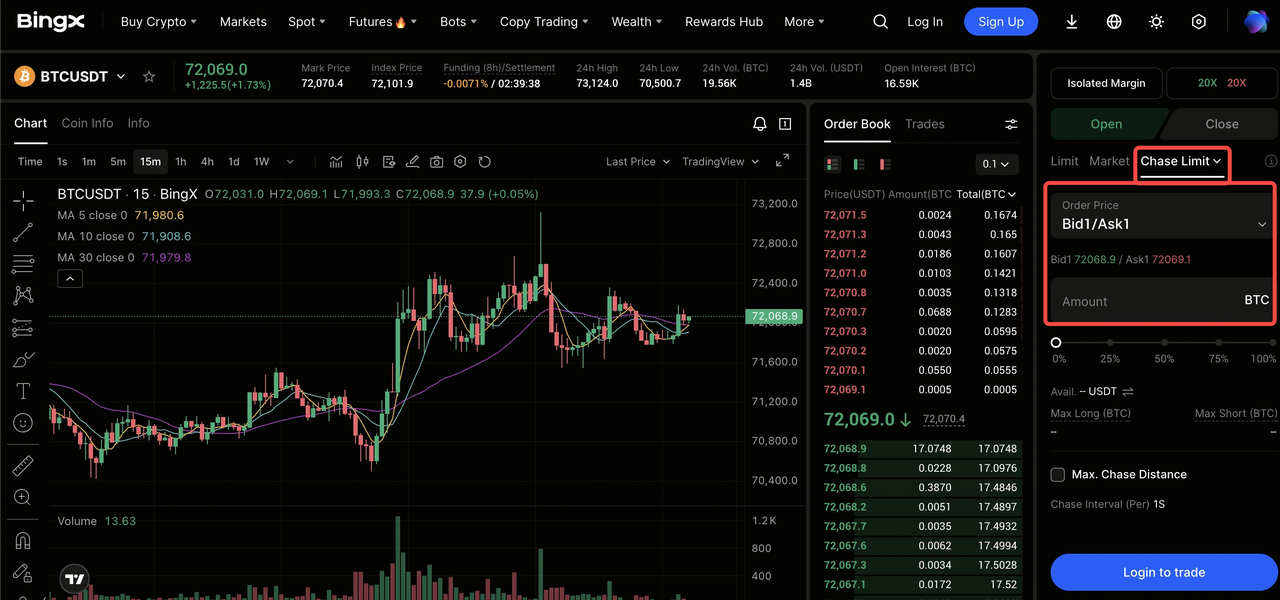
- Access the Trading Interface: Log in to your account and navigate to the Perpetual Futures trading terminal.
- Toggle Order Type: In the order placement panel (usually on the right), click the current order type (e.g., Limit) and select Chase Limit from the dropdown menu.
- Configure Chasing Parameters: Select your preferred mode, Chase Bid1/Ask1 for immediate top-of-book placement or Chase Distance to maintain a specific gap.
- Set Protection Limits: Enter your order quantity and define the Max Chase Distance (value or percentage) along with the stop action (Fixed or Cancel).
- Submit Order: Click Open Long or Open Short. You can track the real-time price adjustments under the Open Orders and Chase Limit tab.
How to Set Up Chase Limit Order on the BingX App
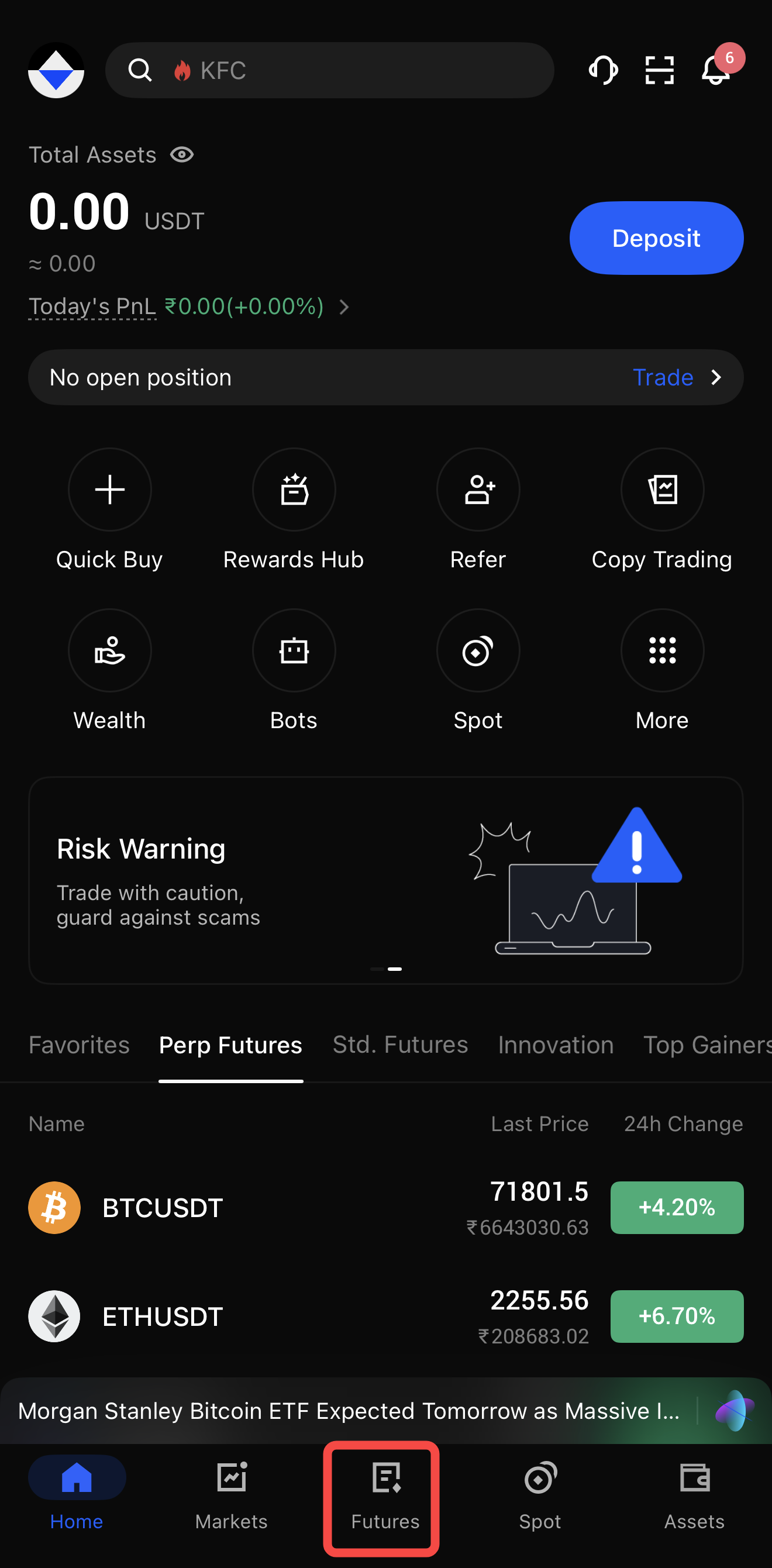
1. Enter Futures Tab: Open your BingX App and tap on Futures in the bottom navigation bar, ensuring you are in the Perpetual section.
2. Select Chase Limit: Tap the order type selector located below the Buy/Sell buttons and choose Chase Limit Order.
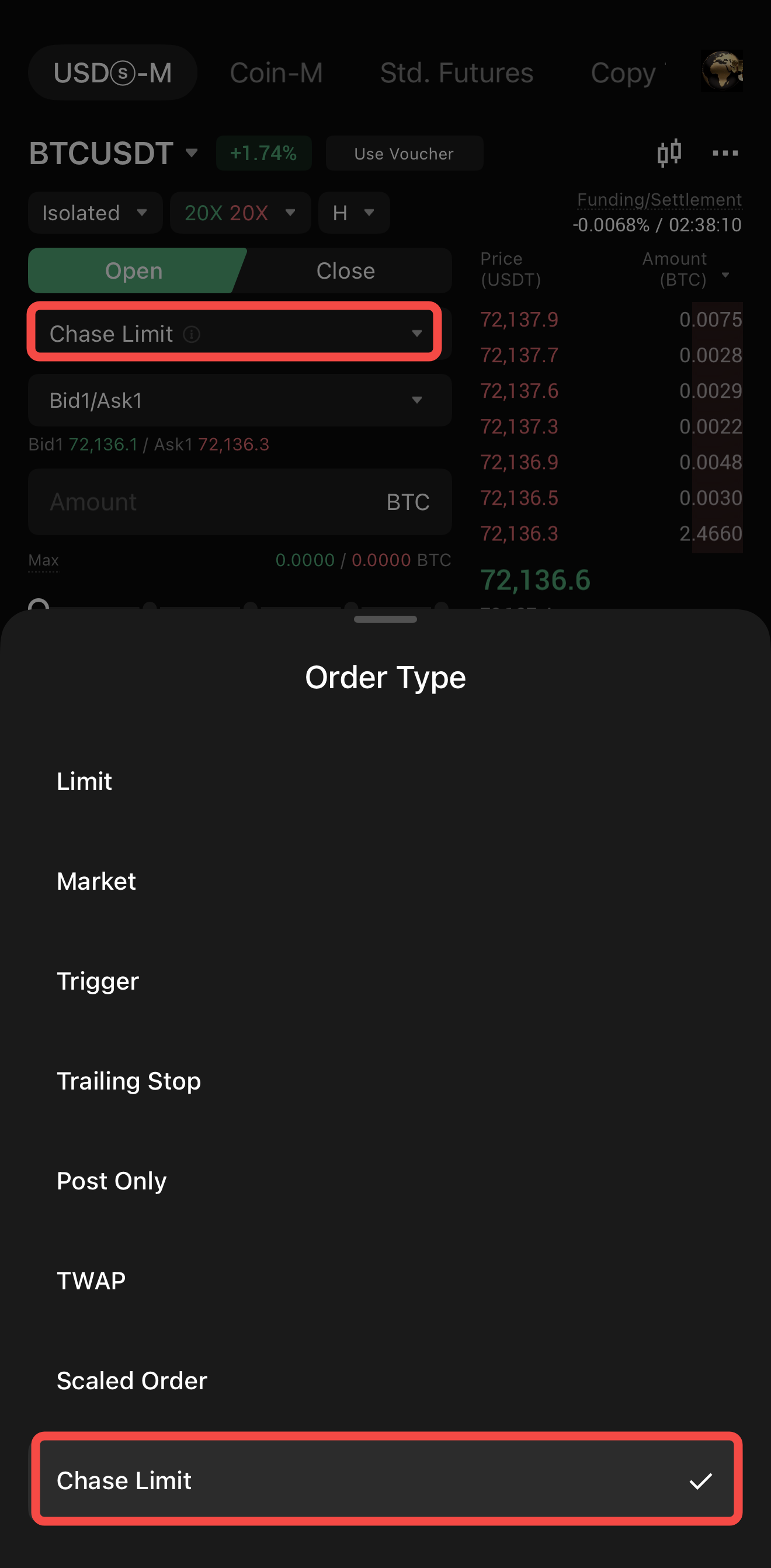
3. Define Order Details: Input the amount you wish to trade and select your chase mode; if using Chase Distance, enter your desired price offset.
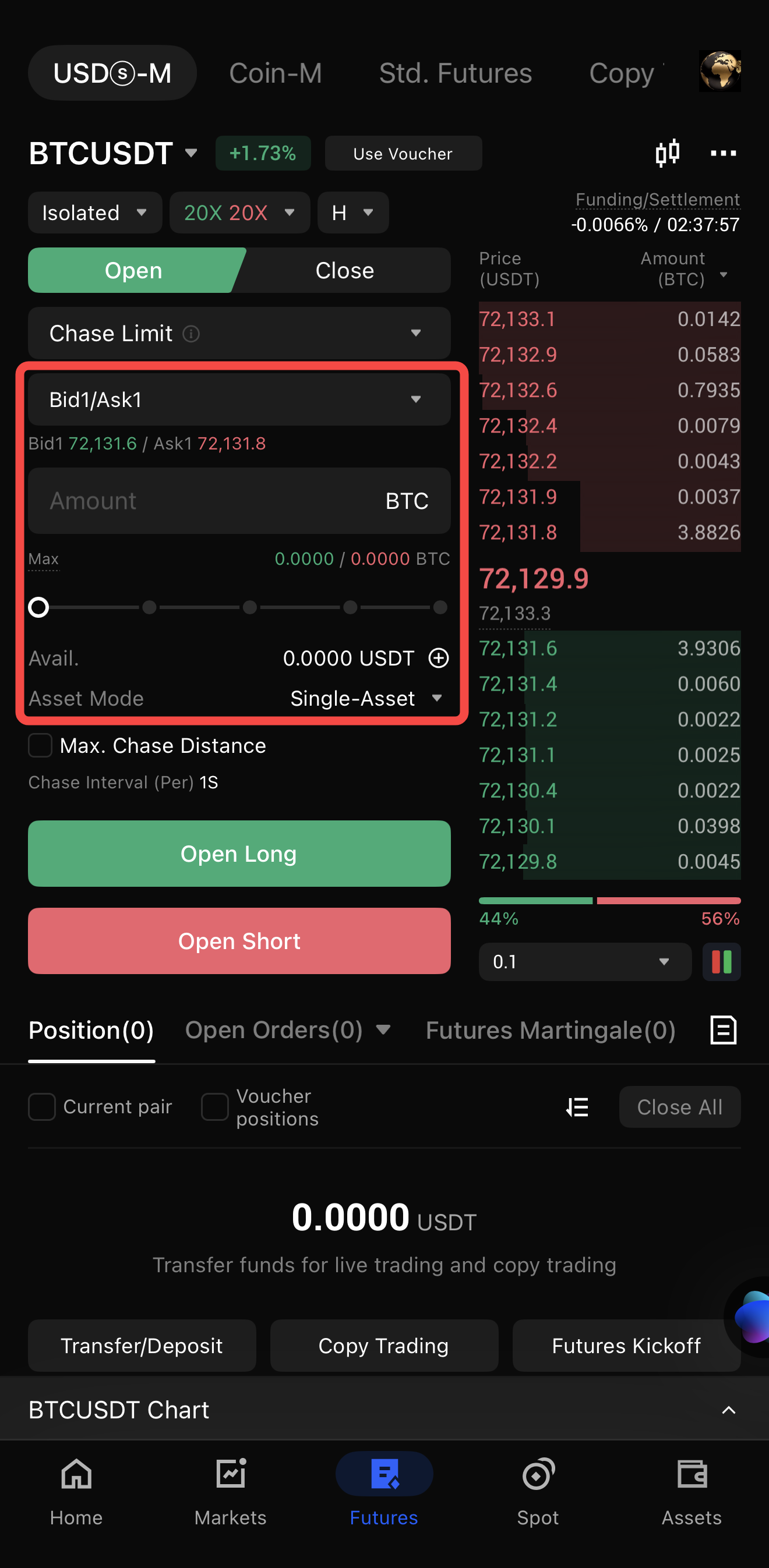
4. Activate Max Distance: Check the Max. Chase Distance box to set your price ceiling or floor, ensuring you won't chase a volatile spike too far.
5. Confirm Position: Tap the Long or Short button to launch. You can view the live chase status by tapping Open Orders at the bottom of the screen.
Key Considerations When Using Chase Limit Orders
When using Chase Limit Orders on BingX, the strategy operates primarily on Post-Only logic, meaning the order will automatically cancel if it fails to place as a Maker after five consecutive attempts. In high-volatility scenarios, such as flash crashes or rapid price gaps, the market may move beyond your Max Chase Distance instantly, potentially leaving the order unfilled and requiring manual adjustment. Additionally, it is important to note that these orders are static once active; you cannot modify the quantity or distance parameters mid-execution and must cancel and replace the order to implement any changes.
Conclusion: How to Make the Most of Chase Limited Orders for Precision Execution
The Chase Limit Order is a transformative feature for the BingX ecosystem, offering a professional-grade solution to the missed entry problem. By automating the re-quoting process, BingX allows traders to focus on strategy rather than order book logistics.
However, remember that while Chase Limit Orders improve fill rates, they do not guarantee an entry if the market gaps significantly past your Max Distance. Professional traders should use the BingX Futures Calculator to plan their entries and ensure their Max Distance aligns with their risk management plan.
Related Reading
- What Are the Different Order Types Supported on BingX Futures and How to Use Them?
- What Is Hedge Mode vs. One-Way Mode to Master Your Position Strategy on BingX Futures Trading?
- What Is Limit Order in Futures Trading and How to Use It on BingX Futures? A 2026 Guide
- What Is a Trailing Stop Order and How to Lock in Maximum Profits on BingX Futures?
- What Are Post-Only Orders and How to Use Them to Settle Lower Fees on BingX Futures?
FAQs on Chase Limit Orders in Trading Futures
1. Is a Chase Limit Order guaranteed to fill?
No. While it significantly increases your chances by tracking the price, it may not fill if the market moves faster than the system can re-quote or if the price exceeds your Maximum Chase Distance.
2. Why should I use Chase Limit Order instead of a Market Order?
Market orders take liquidity and incur higher Taker fees and slippage. Chase Limit Orders provide liquidity, securing lower Maker fees and ensuring you don't get a bad fill during a price spike.
3. Can I modify a Chase Limit Order once it’s active?
On BingX, parameters like Max Distance or Quantity cannot be edited while the order is chasing. You must cancel the current order and place a new one with updated settings.
4. Does it work for both Long and Short positions?
Yes. For Longs, it chases the Bid1 (buy) price. For Shorts, it chases the Ask1 (sell) price.
