
Navigating the high-velocity 2026 spot market requires more than just a 'buy low, sell high' mentality; it requires a surgical approach to trade automation. On BingX spot trading, the Trigger Order is the silent sentinel that allows you to execute trades only when specific market conditions are met. Unlike a standard Limit Order, which sits visible in the order book, a Trigger Order remains latent, activating only when the market price reaches your predefined threshold.
As a leading global exchange, BingX utilizes a sophisticated algorithmic matching system designed for both institutional-grade precision and retail simplicity. By mastering the logic of trigger conditions, you can trade with higher confidence, knowing that your entry and exit strategies are automated to react to real-time market shifts even when you are offline.
This guide breaks down exactly what a Trigger Order is, the mechanics of the latent-to-active execution path, and why it is the most critical tool for building a stable, reusable spot trading framework.
What Is a Trigger Order and How Does It Work?
A Trigger Order is a conditional instruction that acts as the foundation for automated trading on BingX Spot. It functions as a Two-Step mechanism: the system monitors the market until a Trigger Price is hit, at which point it automatically places a Market or Limit order as preset by the trader.
In practice, the Trigger Order functions as the administrative brain of your trading strategy. Its primary purpose is to ensure that execution occurs only at optimal moments, such as a breakout above resistance or a breakdown below support. By decoupling the activation from the execution, BingX ensures that your funds are not unnecessarily locked in the order book, providing a layer of capital flexibility that standard orders cannot match.
How Trigger Orders Work on the BingX Spot Market
On BingX, Trigger Orders are engineered for precision and capital efficiency, utilizing a latent execution path to ensure your strategy remains invisible until the moment of activation. Here is the breakdown of its mechanics:
- The Latent State: Before the trigger is hit, the order does not enter the order book. It exists only in the Trigger Orders tab, meaning it does not influence market sentiment or buy/sell walls.
- Balance Flexibility: Crucially, a Trigger Order does not freeze your balance while in its latent state. You can set multiple triggers for the same capital; the system will only verify fund availability at the exact microsecond the trigger condition is met.
- Execution Paths: Once triggered, the system can follow two paths:
- Market Trigger: Instantly fills at the best available market price.
- Limit Trigger: Places a limit order at your preset price, waiting for a specific match.
- Condition Dependency: On BingX Spot, the trigger is typically tied to the Last Price, the most recent transaction on the exchange.
- Price Gaps and Slippage: If a Trigger Order is set as a Market type, it will fill immediately but may be subject to slippage in thin markets. If set as Limit, it guarantees price but risks being bypassed if the market moves too fast.
Trigger Order vs. Limit Order: Key Differences
While a Limit Order tells the exchange Buy this at $100, a Trigger Order adds a layer of logic: "Watch the market, and only if it hits $110, then attempt to buy at $100." This distinction is vital for breakout trading and risk management.
|
Feature |
Limit Order |
Trigger Order |
|
Visibility |
Visible in the Order Book |
Latent (Hidden from the book) |
|
Fund Status |
Freezes funds immediately |
Does not freeze funds until triggered |
|
Primary Function |
Immediate price control |
Conditional market entry/exit |
|
Risk Control |
Limited (Static entry) |
High (Automated response to price) |
|
Best Scenario |
Buying known dips |
Breakout trading & Stop-Losses |
While the Limit Order tells the market what you want right now, the Trigger Order acts as your shield and scout. For a BingX trader, the Trigger Order is the objective tool used to verify if a market trend has truly begun. By calculating entries based on a confirmed trigger, BingX protects you from fake-outs, those localized price wiggles that don't reflect a genuine trend change.
How to Use Trigger Orders as a Safety Mechanism (TP/SL)
For both beginners and pros, the ultimate enemies in spot trading are drawdown and emotional indecision. Trigger orders enable the Take-Profit (TP) and Stop-Loss (SL) strategies that define professional trading.
- Protecting Capital: If you hold BTC at $70,000, you can set a Trigger Order (Stop-Loss) at $68,000 to sell at Market. If the price crashes, your assets are liquidated into USDT automatically, capping your loss.
- Locking Profits: Conversely, setting a trigger at $75,000 ensures you exit the market with gains without needing to monitor the 1-minute chart.
During Volatility: Professional traders often set their Order Price slightly beyond the Trigger Price for Limit Triggers. For example, if the trigger is $900, they might set the buy limit at $905 to ensure the order is filled even as the price climbs rapidly.
How to Set a Trigger Order on BingX Spot: A Step-by-Step Guide
On BingX, you can configure your trigger conditions directly within the spot trading terminal.
Selecting Your Trigger on BingX Web
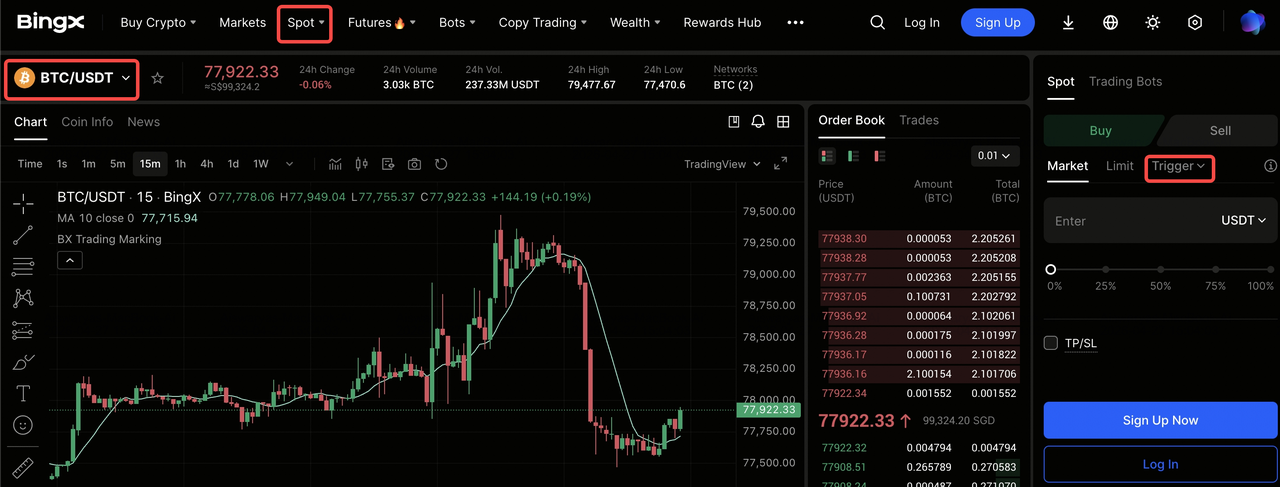
1. Navigate to Spot: Open the trading pair, e.g., BTC/USDT.
2. Toggle Order Type: In the order panel, click the dropdown and select Trigger.
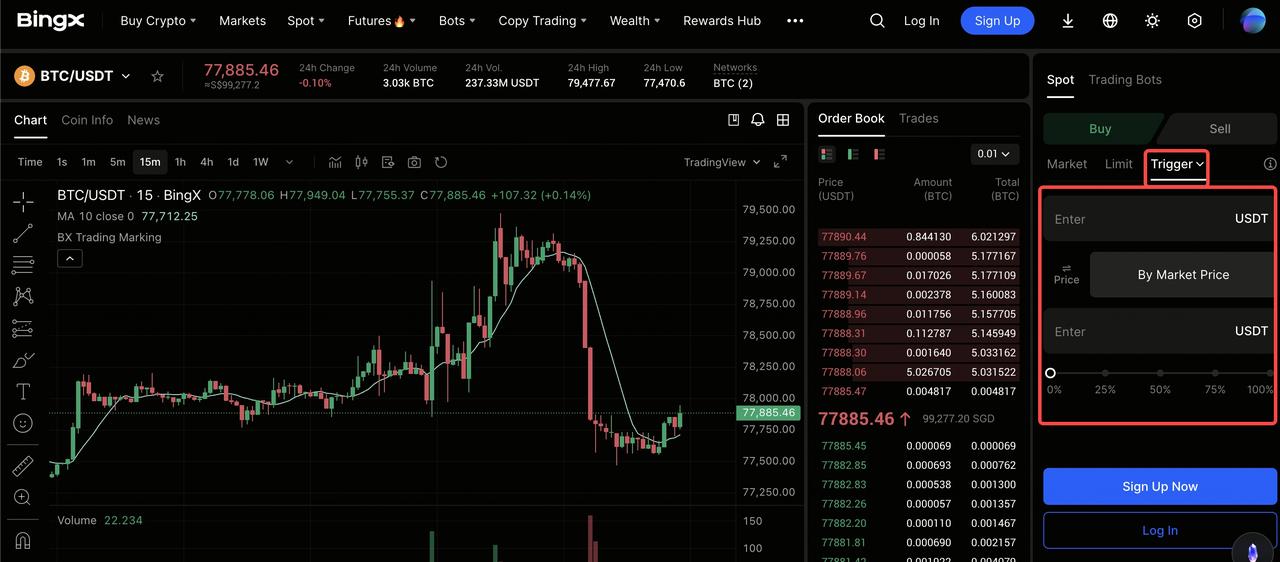
3. Set Trigger Price: Enter the price that will activate the order.
4. Choose Execution: Select Market for speed or Limit for price control.
5. Confirm: Enter your amount and click Buy or Sell.
Setting Up Your Trigger Order on the BingX App
1. Trade Tab: Tap Trade and ensure Spot is selected.
2. Order Dropdown: Tap the current order type and select Trigger.
3. Input Criteria: Set your Trigger Price and your desired Buy/Sell amount.
4. Review and Place Your Order: Tap the Buy/Sell button to set your latent instruction.
Pro-Tips for BingX Spot Traders: Navigating Trigger Logic
The gap between the Trigger Price and the execution can determine your success. Use these professional guardrails to manage your automation:
- Monitor Balance Availability: Since Trigger Orders don't freeze funds, it is easy to accidentally spend your balance on a different trade. Always ensure you keep enough USDT in your Spot Account to fuel your triggers.
- Use Market Triggers for Stops: In a flash crash, a Limit Trigger might be gapped or skipped. For emergency exits, a Market Trigger is the safest way to ensure you exit the position.
- Avoid Clustering: Don't set your triggers at exactly the same round numbers as everyone else, e.g., $70,000. Setting a trigger at $69,985 can often lead to faster execution by beating the crowd at the major psychological level.
Conclusion: How to Trade Spot with Precision and Fairness on BingX
The Trigger Order remains one of the most transformative features of the BingX spot ecosystem, acting as a logical arbiter in a volatile market. By decoupling your active balance from your future intentions, BingX offers a professional-grade environment where your strategy is tested against confirmed price action rather than emotional impulses.
However, the primary objective of any professional trader is capital preservation. While the Trigger Order automates your plan, it does not guarantee a profit if your underlying analysis is incorrect. Traders should always verify their trigger levels and use the BingX Spot Calculator to understand their potential PnL before setting automated logic.
Ready to see it in action? Open a BingX Demo Account and practice setting Trigger orders to see how your latent orders come to life.
Related Reading
- How to Use Order Book Depth and Market Data for Bitcoin Trading
- Best 10 Crypto Spot Trading Platforms for Beginners in 2026
- How to Buy and Sell Crypto on the BingX App: A Step-by-Step Guide (2026)
- What Is Trading Psychology: How to Control Emotions and Trade Rationally
- What Is Slippage in Crypto and How Does BingX Guarantee Exact Prices?
FAQs on Trigger Orders in Spot Trading
1. Why was my Trigger Order triggered but not filled?
This typically happens with Limit Trigger orders during high volatility. If the market price gaps past your Order Price before the engine can match it, the order remains open in the book. Use Market Trigger for guaranteed fills.
2. Does a Trigger Order freeze my assets?
No. This is a major advantage of Trigger Orders. Your balance only becomes frozen or committed at the moment the trigger is activated.
3. Can I set a Trigger Order for a price better than the current market price?
Yes. You can set a trigger to buy if the price drops to a certain level (Stop-Buy) or sell if it rises (Take-Profit), providing total flexibility for any market scenario.
4. What is the difference between a Trigger Order and an OCO?
A Trigger Order is a single conditional instruction. An OCO (One-Cancels-the-Other) is a pair of trigger orders where the execution of one automatically cancels the other, ideal for setting a TP and SL simultaneously.
